
Vikram Sarabhai Library,
Indian Institute of Management Ahmedabad,
Sargam Marg, Vastrapur,
Ahmedabad, Gujarat - 380015
Email: reference@iima.ac.in
Phone: +91-79-7152-4984/90/79/77

- Markets – It provides real-time global market data across equities, fixed income, FX, commodities, industries, money market, and derivatives, with indices, heatmaps, and market movers for quick insights.
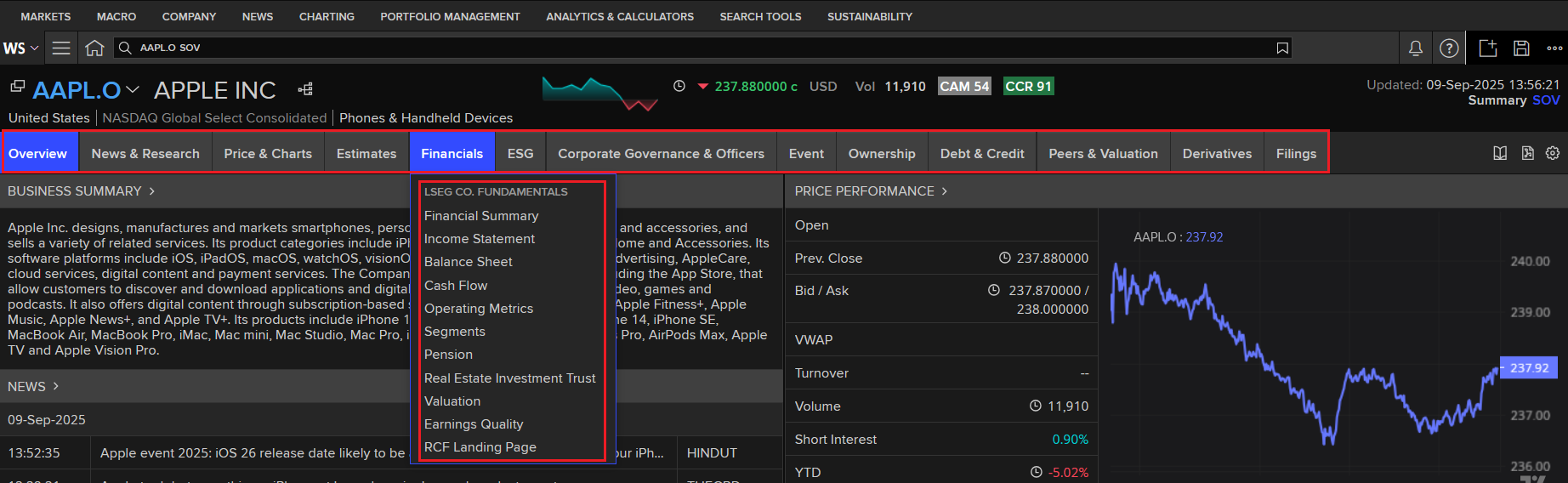
- Company– It provides detailed information on global companies, including profiles, financial statements, research, estimates, price history, debt structure, and liquidity. It also covers ownership structures, earnings estimates, valuations, and peer comparisons.
- Macro- It provides access to global economic indicators such as GDP, inflation, interest rates, employment, and trade. It offers historical data, forecasts, and release calendars for tracking economic developments. Macro modules provide countries and regions related information, economic monitor & indicators, DataStream chart board, central bank poll & economic indicator poll, and commodities polls.
- News – LSEG News module provides comprehensive, real-time coverage of global financial news and economic events. LSEG News covers from Reuters, along with other trusted sources such as WSJ professional, to ensure users have access to accurate and timely market-moving information. The module allows users to filter news by company, sector, asset class, or geography, making it highly customizable for research and analysis. Additionally, it provides major Global issues like United States politics, the Ukraine crisis, and Sustainable financial News.
- Charting – It provides powerful visualization tools to analyze financial instruments, economic indicators, and market trends. Users can create customizable time-series charts, apply technical indicators, and overlay multiple datasets for comparative analysis. It supports both simple and advanced charting, making it useful for exploring market behavior, forecasting, and presenting insights in a clear visual format.
- Portfolio Management – It provides users to build, track, and analyze portfolios of securities or assets. It offers real-time monitoring, performance measurement, and risk analysis with scenario modeling.
- Analytics & Calculators – It offers a wide range of pre-built financial models and tools. Users can perform valuations, and risk calculations, option pricing, and scenario testing across asset classes. It supports both simple and advanced analytics.
- Search Tools – It allows users to quickly locate information across the platform. It supports searches for companies, securities, funds, industries, news, and economic indicators. With advanced filters and smart suggestions,
- Sustainability – Sustainability focuses on ESG (Environmental, Social, and Governance) data and analysis. It provides company-level ESG scores, climate risk metrics, and sustainability reports to evaluate responsible investing.
The EBSCO Discovery Service offers a single access point to search a vast range of our library's resources. It is an online research tool that "pulls together" almost all of our library resources (except databases) so that they can be explored on a single page. It will also provide the full bibliographic description along with the source link and full text link to download or read online. If you need more help, refer to this video guide: How to Use the EBSCO platform.
Vikram Sarabhai Library,
Indian Institute of Management Ahmedabad,
Sargam Marg, Vastrapur,
Ahmedabad, Gujarat - 380015
Email: reference@iima.ac.in
Phone: +91-79-7152-4984/90/79/77
- Inter Company name or ticker code

- Select require parameter and export data in Excel and PDF format.

The EBSCO Discovery Service offers a single access point to search a vast range of our library's resources. It is an online research tool that "pulls together" almost all of our library resources (except databases) so that they can be explored on a single page. It will also provide the full bibliographic description along with the source link and full text link to download or read online. If you need more help, refer to this video guide: How to Use the EBSCO platform.
Vikram Sarabhai Library,
Indian Institute of Management Ahmedabad,
Sargam Marg, Vastrapur,
Ahmedabad, Gujarat - 380015
Email: reference@iima.ac.in
Phone: +91-79-7152-4984/90/79/77
- Use the search bar to find a specific industry, or browse through industries listed under the Market category.

- Choose the region and other require parameter like events, fillings, earnings session ESG etc.

The EBSCO Discovery Service offers a single access point to search a vast range of our library's resources. It is an online research tool that "pulls together" almost all of our library resources (except databases) so that they can be explored on a single page. It will also provide the full bibliographic description along with the source link and full text link to download or read online. If you need more help, refer to this video guide: How to Use the EBSCO platform.
Vikram Sarabhai Library,
Indian Institute of Management Ahmedabad,
Sargam Marg, Vastrapur,
Ahmedabad, Gujarat - 380015
Email: reference@iima.ac.in
Phone: +91-79-7152-4984/90/79/77
- In the LSEG Workspace desktop main page, type “Screener” in the search box at the top, and click on the first result (the one with the App icon):

- Select the required parameter from the chart, i.e., currency, company, organization type, and headquarters, then click on Add Filters.
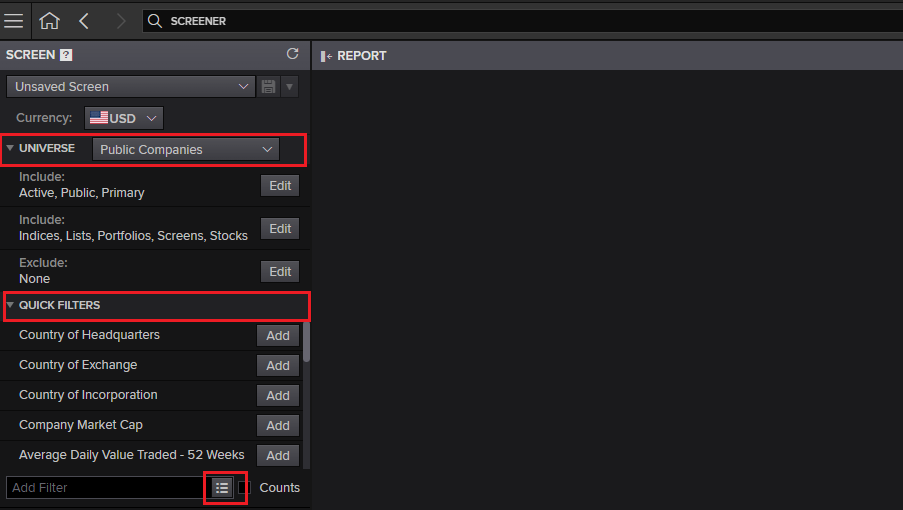
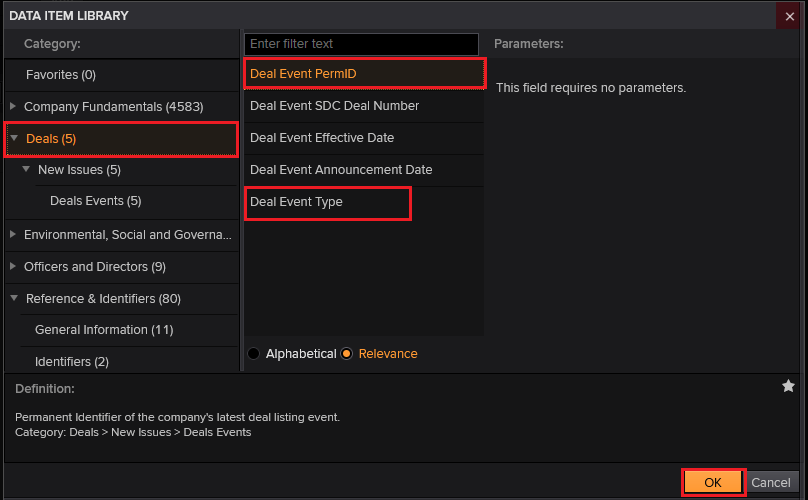
- Select the required item from the filter or the Data item Library. And choose any category, i.e., Deals. And add another required field, like deal types.
- After applying filters, the relevant dataset will appear. Click the Excel or PDF icon to download the data.
The EBSCO Discovery Service offers a single access point to search a vast range of our library's resources. It is an online research tool that "pulls together" almost all of our library resources (except databases) so that they can be explored on a single page. It will also provide the full bibliographic description along with the source link and full text link to download or read online. If you need more help, refer to this video guide: How to Use the EBSCO platform.
Vikram Sarabhai Library,
Indian Institute of Management Ahmedabad,
Sargam Marg, Vastrapur,
Ahmedabad, Gujarat - 380015
Email: reference@iima.ac.in
Phone: +91-79-7152-4984/90/79/77
- Type SDC in the search box at the top of the screen and select the SDC Platinum application from the results.

- Select New Session in the left navigation panel to begin a new search.

- Select the required module and one of its sub-modules, for example, Mergers & Acquisitions > M&A, and then click Next.

- In the data item Library, you may browse different category tabs or click on the All Items tab and use the search box to find items by keyword.

- You may customise the date and click on Save, the data will appear above.

- Click on Add Output, choose Report, League Table, or Volume Analysis, then click Next to add it to your session.

The EBSCO Discovery Service offers a single access point to search a vast range of our library's resources. It is an online research tool that "pulls together" almost all of our library resources (except databases) so that they can be explored on a single page. It will also provide the full bibliographic description along with the source link and full text link to download or read online. If you need more help, refer to this video guide: How to Use the EBSCO platform.
Vikram Sarabhai Library,
Indian Institute of Management Ahmedabad,
Sargam Marg, Vastrapur,
Ahmedabad, Gujarat - 380015
Email: reference@iima.ac.in
Phone: +91-79-7152-4984/90/79/77
Signing in
- Download the Excel Add-in and install it.
- Click on the Workspace tab in Excel, → click sign in (Use same credentials)

- Templates: In templates to design custom outputs for workspace apps
- Build Formula: The Build formula allows pulling data from the LSEG source into Excel.
- App Library: Desktop version of workspace.
- Screener: It provides in-depth information on public and private companies and deals.
- Refresh and pause all workspaces' data
- Datastream Formula: Datastream serves as a powerful historical financial, delivering vast data and analytics capabilities directly into Excel, enabling dynamic, chart-based, and formula-driven financial analysis.
- Click on DataStream Formula, a pop-up opens for the formula builder → click on the filter icon for the DataStream navigator.

- Go to Category → Select Macroeconomics or type GDP, Inflation, or require keyword → select source, country, frequency, etc.
- After applying filters, click on Use and Apply. The data will show in the sheet.

- The Deals tab provides transactions & deal analytics for strategy and market insights. An Excel add-in helps you create specific Excel-based reports for deal analysis.
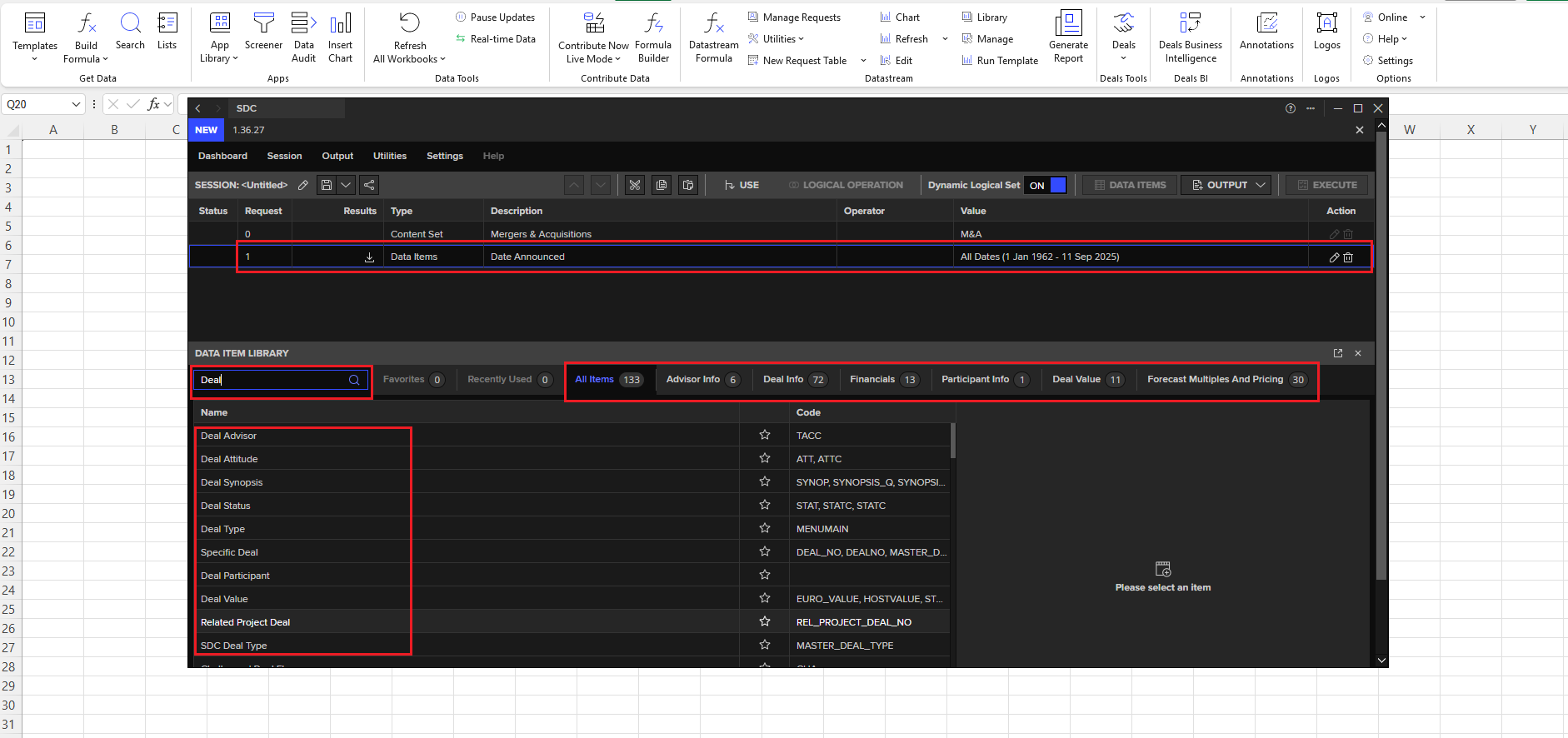
- Select the SDC Platinum from the Deals tab. The app will launch in a new pop-out window. and select the required deal type.

- Use the Data Item Library to search for the required item, then apply filters to refine your results. The filtered data will appear above and can be downloaded using the download icon.
The EBSCO Discovery Service offers a single access point to search a vast range of our library's resources. It is an online research tool that "pulls together" almost all of our library resources (except databases) so that they can be explored on a single page. It will also provide the full bibliographic description along with the source link and full text link to download or read online. If you need more help, refer to this video guide: How to Use the EBSCO platform.
Vikram Sarabhai Library,
Indian Institute of Management Ahmedabad,
Sargam Marg, Vastrapur,
Ahmedabad, Gujarat - 380015
Email: reference@iima.ac.in
Phone: +91-79-7152-4984/90/79/77
- Introduction to Workspace
- LSEG Workspace | Desktop
- LSEG Workspace Overview
- Basic Navigation
- LSEG Workspace Add-in
- Workspace add-in for Excel
- LSEG Workspace Add-Ins – Office Installation Guide
- Add-Ins Workspace Installation Guide
- LSEG Workspace Add-Ins – 365 Installation Guide
Vikram Sarabhai Library,
Indian Institute of Management Ahmedabad,
Sargam Marg, Vastrapur,
Ahmedabad, Gujarat - 380015
Email: reference@iima.ac.in
Phone: +91-79-7152-4984/90/79/77